BabyBright 6.0 Is Here: Milestones, Music, and Family Life in One App

There is so much to remember in the first five years of a child’s life, and just as much to manage along the way. Meet the redesigned BabyBright by CogniFit, a place to follow development, keep daily routines organized, discover music and activities, and hold on to the moments that make your family’s story yours.
In the first days with a newborn, time can feel wonderfully strange. A feeding, a sleepy expression, the first time those tiny fingers wrap around yours: the moments are vivid, even when the hours blur together. Later, you find yourself wondering when your child first pointed at the dog, started using a favorite word, or decided to do everything independently.
You might have the photos somewhere on your phone, the measurements in a notebook, and the next appointment in a calendar. The information is there, but it rarely lives in the same place. BabyBright 6.0, the newly redesigned parenting app from CogniFit, is built around that familiar reality. It brings together developmental observations, growth records, daily care, family memories, and age-relevant ideas without asking you to turn parenting into a project.
Whether you’re preparing to welcome a baby or already navigating the wonderfully busy preschool years, you can explore BabyBright in your browser or download it from the App Store and Google Play.
What’s New in BabyBright 6.0?
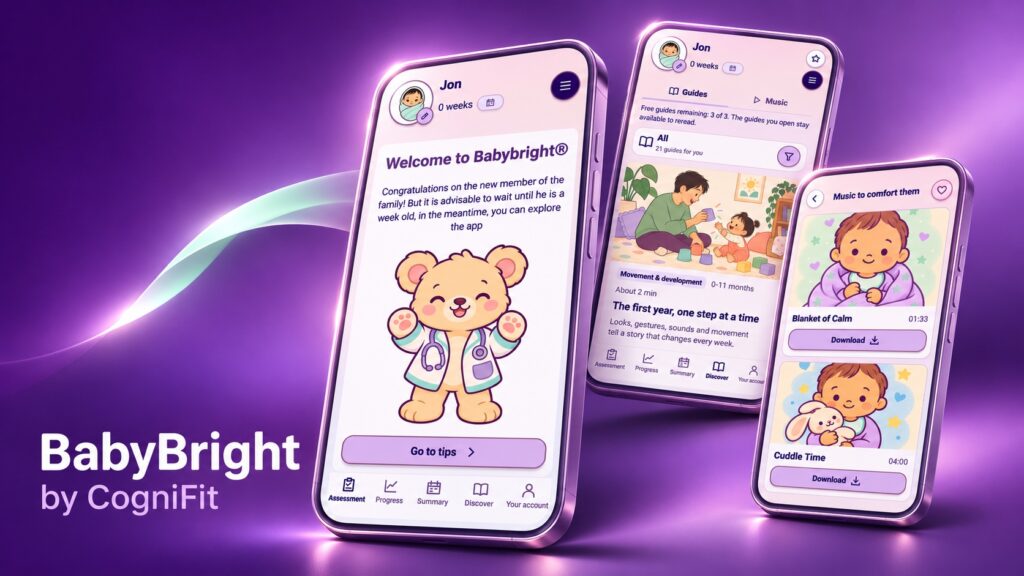
BabyBright 6.0 introduces a redesigned experience that goes beyond a visual update. The new version brings clearer weekly observations, refreshed progress and growth views, simpler routines, improved family profiles, and more contextual guidance from Meddy. Updated illustrations and refined layouts for phones and tablets also make the app easier to navigate.
The difference becomes meaningful in everyday use. Instead of jumping between different places to understand what you’ve noticed, what you’ve recorded, and what’s coming up, you have a more connected view of your child’s day-to-day life. You can spend two minutes checking a measurement or take a little longer exploring activities for the stage your child is in. BabyBright is designed to work at your family’s pace, not to set one for you.
“Every child grows at their own pace, and every family experiences that journey differently. With BabyBright 6.0, our goal is to give parents a clearer picture of their child’s progress while making everyday routines easier to manage, without unnecessary pressure or comparisons,” said Carlos Rodríguez, CEO of CogniFit.
You Can Get to Know BabyBright Before Your Baby Arrives
Some parents start thinking about milestones long before the first one happens. If you’re expecting, BabyBright lets you become familiar with the experience before your child is born. You can explore the app, discover its tools, and see how you might want to use it when your baby arrives.
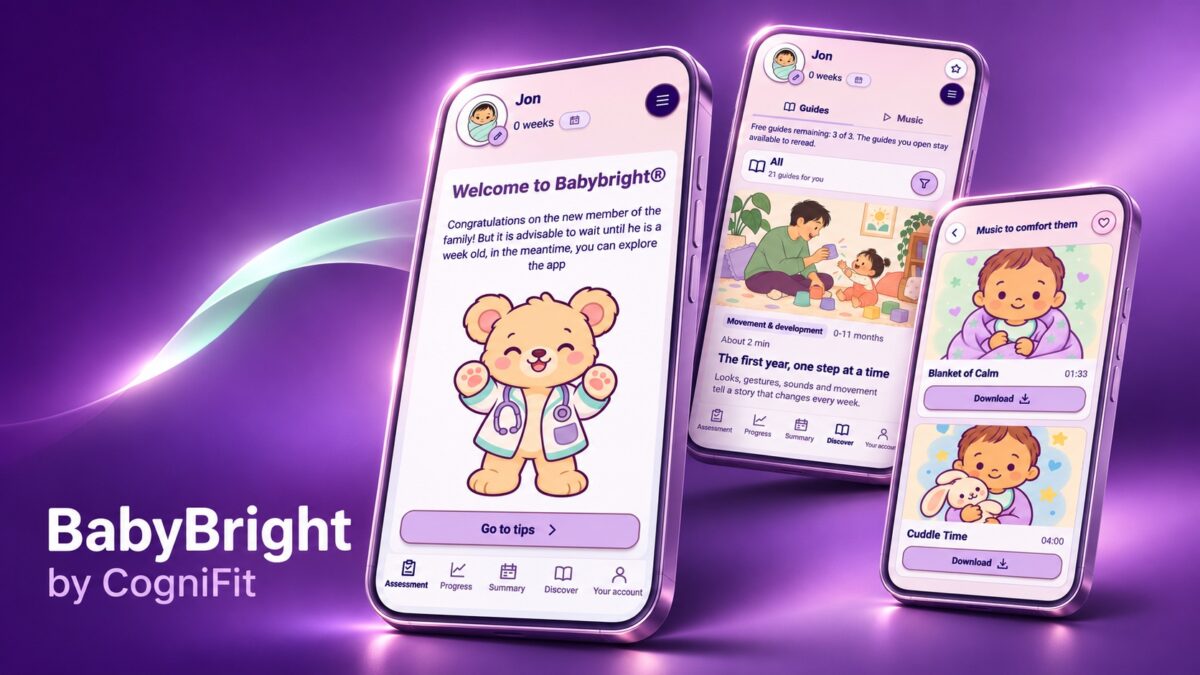
After birth, there’s no pressure to begin completing developmental questions immediately. The newborn welcome screen invites parents to explore the app and recommends waiting until the baby is one week old before starting guided observations. That distinction matters: BabyBright can be part of your preparations, while its milestone questions are intended for observing a child after birth.
Those first days already have plenty going on. As your family’s routines take shape, BabyBright gives you a place to start keeping the details that are useful to you, then return to them whenever you need.
Track Developmental Progress Without Turning Milestones Into a Competition
Children often show us that something is changing in small, easily missed ways. A baby turns toward a familiar voice. A toddler tries a new gesture. A preschooler finds a different way to explain what they want. These aren’t moments that always make it into a photo album, but they can be lovely to look back on.
BabyBright helps parents and caregivers record what they actually observe through short, illustrated questions organized by age and across four areas: movement, language, cognitive-perceptual development, and social-emotional development. The questions cover different aspects of how children move, communicate, explore their surroundings, and interact with others.
The response is deliberately uncomplicated: “Yes” or “Not yet.” If you’re not sure about something, you can leave it and come back later. As you add observations, BabyBright tracks them by week and developmental area, then brings them together in visual progress views. You can look back at the path your child has taken, notice changes across the four areas, and understand how your observations fit together over time. It is a much clearer picture than a collection of answers you have to remember on your own.
Crucially, this isn’t a race against another child’s timeline. The progress views reflect observations you enter; they are not a clinical measurement of a child’s abilities or a diagnostic score. BabyBright is intended to help families follow changes over time, not compare children or judge anyone’s parenting. You decide when to check in, what to record, and when to put your phone away and enjoy the moment itself.
Keep Feeding Notes, Growth Charts, and Family Plans Together
Sometimes the most valuable feature of an app is also the most practical. You want to remember when your baby last fed, find a recent weight measurement, or check the appointment you added several weeks ago. BabyBright brings those everyday records closer together so they’re easier to find when life gets busy.
You can record weight and height and review the measurements in visual growth views. For day-to-day care, the app includes feeding records and routines, with space to keep useful details such as amounts, appetite, and foods. Its calendar brings together appointments, reminders, notes, and family plans. When something worth remembering happens, you can mark a milestone and keep a photo alongside the story of your child’s progress.
If you have more than one child, each can have a separate profile, keeping their observations, measurements, and routines distinct. That’s a small but important detail for families who would otherwise be searching through several sets of notes. And there’s no expectation that you document every hour: one helpful entry is still helpful.
A Little Music for Whatever Mood the Day Brings
BabyBright isn’t only about charts and records. It also has a music feature that offers something you can enjoy with your child in the middle of an ordinary day.
Open the music area and the app asks how your child seems to be feeling. You can choose from moods such as Happy, Excited, Tired, or Sad, and BabyBright suggests tracks to explore. The selection includes titles such as Blanket of Calm and Cuddle Time, with an in-app option to download individual tracks.
Maybe you want some music while you play on the floor, or a familiar sound during a quiet moment together. The choice is yours, and so is the pace. The suggestions respond to the mood you’ve selected; they aren’t a medical assessment of your child’s emotions, and the tracks aren’t presented as a treatment or a guarantee of sleep or relaxation.
Ideas for Play, Language, Reading, and Those Tricky Little Moments
Some days you have a plan for playtime. Other days it’s raining, everybody’s tired, and you’re looking at a pile of toys wondering what to do next. BabyBright’s practical guides offer ideas you can adapt to the child in front of you, with topics including movement, play, communication, reading together, emotions, and daily routines.
The activities are refreshingly ordinary. A tower of cups can become a game of taking turns. A familiar picture book can turn into a conversation about what your child notices. A small choice can make a difficult transition feel a little more manageable. The point isn’t to stage elaborate learning activities, but to find something enjoyable in the minutes you already share.
BabyBright also offers family guides, including resources for multilingual households, and short activity videos with Teddy. Families can explore these resources in the app or visit BabyBright’s online guides and video library. The multilingual guide recognizes that children may grow up surrounded by different languages, stories, songs, and traditions.
Available in Eight Languages, With a Friendly Guide Named Meddy
Family routines and the words we use to describe them differ from home to home. BabyBright is available in eight languages, making it easier for more parents and caregivers to use the app in a language that feels natural to them. That is especially welcome in households where different generations or caregivers speak different languages.
There’s also a reassuring bit of personality in the redesigned experience. Meddy, BabyBright’s bear companion, appears along the way to help explain features and guide families through the app. Meddy makes the interface feel more welcoming, while the practical guidance remains just that: help with using BabyBright, not a replacement for advice from a qualified healthcare professional.
From Birth to Age Five, at Your Child’s Pace
BabyBright is designed to support families from birth through age five, with developmental observations, visual progress views, growth records, routines, calendars, memories, and family guides. As your child moves from infancy into the preschool years, you can continue reviewing observations and keeping everyday records in one place, at your family’s own pace.
It is important to be clear about what the app does, and what it doesn’t. BabyBright helps organize observations of a child’s development, but it does not provide medical diagnoses or replace the judgment of a pediatrician or other healthcare professional. If something about your child’s health or development concerns you, a qualified professional is the right person to ask.
BabyBright is a CogniFit experience with privacy considerations built into its design. The service describes family-linked access, protected handling of sensitive operations, and options to review or request deletion of an account. More information is available in the privacy policy. Features and access may vary by plan; the app stores list in-app purchases and subscriptions.
The Moments Are Already Happening. Give Them a Place to Stay
There will always be things you don’t write down. That’s part of family life, too. But imagine being able to look back and see how a few everyday observations became a story: a new sound one week, a new gesture the next, then a word that suddenly appears in every conversation. Alongside it are the practical records that helped you get through those busy days, and the pictures that still make you smile.
That’s what makes BabyBright 6.0 appealing. It doesn’t ask you to do more as a parent. It gives what you’re already noticing, planning, and remembering a home of its own, with music and simple ideas for the time you spend together.
If you’re expecting, take a look around before your baby’s arrival. If your child is already here, open BabyBright and begin with something small: a profile, a measurement, an observation, or a memory from this week. You can build from there whenever it suits you.
Discover the new BabyBright 6.0


Prefer using your browser? Open BabyBright online →